
Website Change Monitor: AI Page Change & Pricing Alerts on the Apify Store →
A tutorial for product marketers, founders and agencies. Canonical page: https://apify.com/rich_minds/website-change-monitor-ai. Disclosure: written by the developer of the Actor.
Every product marketer, founder and agency keeps a list of competitor pages they "should check": the pricing page, the changelog, the careers page, the terms. Checking 30 pages by hand takes about an hour a week, and most weeks nothing happened. The day something does change — the Pro plan goes from $49 to $59, a feature ships, a new EMEA sales team is hired — you hear about it from a prospect on a call.
The usual fixes fall short:
What you actually want is one row per real change, with what moved, how much it matters and what to do about it — and a bill that is zero in the weeks nothing happened.
Website Change Monitor: AI Page Change & Pricing Alerts is an Apify Actor. It fetches your pages (up to 50 itself, on any Apify plan; bigger lists, sections and JavaScript pages go through Website Content Crawler), keeps each page's last version, removes dates, counters, © years and tokens, and compares. Each change that passes your filters becomes one dataset row with:
before → after,notify_sales, update_battlecard, …).You pay per qualified change. Baselines, unchanged pages, noise and flapping pages are never charged by the Actor.
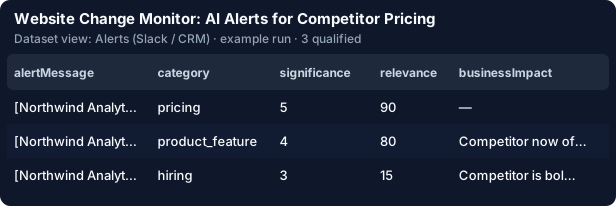
Open the Store page and click Try it. The form is pre-filled with four sample pages of a fictional competitor, Northwind Analytics, each with a "last week" and a "today" version. Press Start. In seconds you get three rows:
| Page | Category | Significance | What changed |
|---|---|---|---|
| Pricing | pricing | 5 | Pro $49 → $59 per seat / month; Business now includes an audit log |
| Changelog | product_feature | 4 | "v4.13 — Launched: AI anomaly alerts, now available on the Pro and Business plans" |
| Careers | hiring | 3 | Product Designer (EU) removed; Senior Sales Engineer – Paris and Account Executive – London added |
The fourth page, a blog whose only edits were a view counter and a date, produced no row. That is the noise filter working, and it is also why you pay nothing for it.
This is what the AI wrote for the pricing change (a real verdict from the demo sample, judged against "flag price, plan and launch changes our sales team must know"):
{"category": "pricing", "significance": 5, "relevance": 90,
 "summary": "The Pro plan price increased from $49 to $59 per seat per month, and the Business plan now includes an audit log.",
 "keyFacts": [{"before": "$49", "after": "$59", "quote": "Pro | $59 per seat / month | unlimited dashboards | email support"}],
 "recommendedAction": "notify_sales"}
The rules alone would have paired the price and stopped. The AI also caught the audit log in the Business row and said who should act.
Replace the sample with your competitors' pages in startUrls. The pricing, changelog, careers and terms pages of 5–10 competitors are a good start. You can also just name them in goalDescription ("we compete with Notion and Slack on pricing") or pick a one-click preset: competitor-pricing, product-launches, legal-policy, hiring-signals, docs-api-changes or ecommerce-price-stock.
{"preset": "competitor-pricing", "sourceMode": "actor",
 "startUrls": [{"url": "https://www.notion.com/pricing"}, {"url": "https://slack.com/pricing"},
               {"url": "https://www.atlassian.com/software/jira/pricing"}],
"baselineFrom": "wayback", "categories": ["pricing", "plan_packaging"], "minSignificance": 3}goalDescription is what the AI scores relevance against — for example "We sell a B2B analytics tool: flag price, plan and launch changes our sales team must know." A careers change that matters to a recruiter scores low for a sales team, and it sinks down the list.
By default (baselineFrom: wayback) a page the Actor has never seen is compared with its latest Internet Archive capture, so the first run already reports what changed since then. Want the whole year? historyBackfill: 12 diffs one capture per month in order and draws a price timeline on the REPORT page ($0.10 per page with a past change, once).
Every row carries a ready-to-post alertMessage plus the impact and the action. The Alerts (Slack / CRM) view is the one to paste into a channel or a CRM note.
Take 30 pages checked daily: 900 page checks a month, fetched by the Actor itself (no crawl bill below 50 pages). At our estimate of 4.4 % of page checks producing a real change (not yet measured over a live month — the Store page will say when it is), that is about 40 changes a month:
The first 25 changes of every account are free, there is no start fee, and the unchanged weeks cost nothing. For comparison, the seat tools above start at $12–35 a month for 10–25 pages.
After the first real run the Actor saves your search as a task (OUTPUT.scheduleTaskUrl): open it, click Schedule, and put your address in notifyEmail. Every run with new changes e-mails a digest grouped by competitor with the trend against the last run ("qualified 4 → 6, price moves 0 → 1"). slackWebhookUrl, teamsWebhookUrl, googleChatWebhookUrl and discordWebhookUrl post the same digest to a channel; webhookUrl POSTs each change.
From code:
from apify_client import ApifyClient

client = ApifyClient("<YOUR_API_TOKEN>")
run = client.actor("rich_minds/website-change-monitor-ai").call(run_input={
    "startUrls": [{"url": "https://www.notion.com/pricing"}, {"url": "https://slack.com/pricing"}],
    "goalDescription": "Flag price, plan and seat-limit changes our sales team must know.",
    "maxQualified": 50,
    "maxDiscoveryChargeUsd": 0.5,
}, timeout_secs=3600)
for item in client.dataset(run["defaultDatasetId"]).iterate_items():
    print(item["url"], item["significance"], item["summary"])
For a CRM or a Google Sheet, upsert on dedupeKey so a change is never written twice. Agencies put every client's pages into monitors: one run, then a digest, a webhook and a white-label REPORT per client.
To be fair: for five pages, Visualping's free plan is simpler. For pages behind your own login, the Distill.io browser extension runs in your session. For brand mentions across the web, Google Alerts is free and unlimited. This Actor is for when you watch dozens of pages, want a typed, scored row per change, and want to pay only when something happened.
Try it: https://apify.com/rich_minds/website-change-monitor-ai — the form is pre-filled, and the demo is free.
Website Change Monitor: AI Page Change & Pricing Alerts on the Apify Store →