Austria Company List: WKO Firmen Scraper by Industry on the Apify Store →
Tutorial article for the Apify blog guest program, dev.to, Medium and Hashnode. Drafted with the listing; the owner publishes it and records the URL in brief.json → marketing.links.
Every registered Austrian business sits in WKO Firmen A-Z, the Chamber of Commerce's public directory, grouped by trade category: IT-Dienstleistung, Baumeister, Elektrogroßhandel, Großhandel mit Lebensmitteln and about a thousand more. A sales team, an agency or an exporter who wants "every machine builder in Upper Austria with a website" opens the category, reads ten companies per page, clicks "Mehr laden", copies name, address, phone and website into a sheet and repeats — about a minute a company, two hours per hundred. Half the entries have no website or phone, and sole traders (e.U.) are natural persons whose contacts you should not be mailing anyway.
IT-Dienstleistung) or an English keyword (it services, construction). Add a Bundesland if you only sell in Vienna or Tyrol.
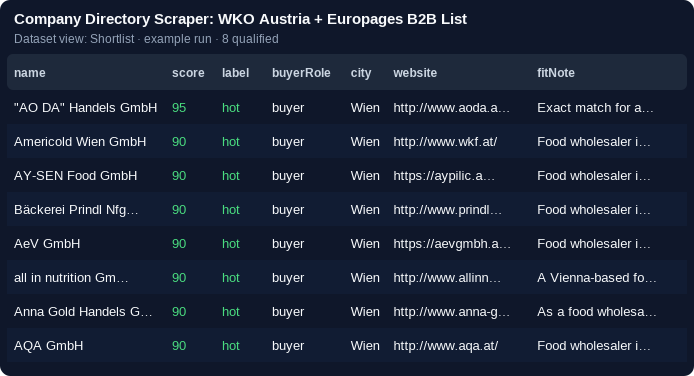
The first 25 qualified companies on your account are free. After that a company that passed your filters costs $0.0025 (rules only) or $0.009 with the AI plus ≈ $0.0021 of tokens. Companies without a website, phone or e-mail, sole traders and companies below your minimum score are never charged, and reading WKO itself costs nothing — there is no source bill. Measured on Großhandel mit Lebensmitteln: 100 read → 23 qualified in 95 s; a repeat run of 23 costs $0.06 rules only, ≈ $0.26 with the AI.
Save the search as a task, open Schedule and pick weekly. Paste a Slack, Teams or Discord webhook into Send alerts to (any plan) and the digest of new companies arrives every run; companies delivered before are skipped and never charged twice. From code:
from apify_client import ApifyClient

client = ApifyClient("<YOUR_API_TOKEN>")
run = client.actor("rich_minds/b2b-directory-companies-ai").call(run_input={
    "activities": ["it services"], "states": ["Wien"], "withContactOnly": True,
    "goalDescription": "Austrian IT service companies that could resell our B2B software",
    "maxQualified": 50, "dedupeAcrossRuns": True,
})
for item in client.dataset(run["defaultDatasetId"]).iterate_items():
print(item["name"], item["score"], item["label"], item["url"])For one company, do. For a list you get ranked rows with a contact route, the Lehrbetrieb badge, sole traders masked, a weekly delta and an API — and you pay only for the companies that pass your filters.
Austria Company List: WKO Firmen Scraper by Industry on the Apify Store →