1688 Supplier Finder: Find Suppliers in China, AI-Vetted on the Apify Store →
A step-by-step guide for Amazon FBA, TikTok Shop and Shopify sellers — and the sourcing agents who buy for them — who want factory-direct prices from 1688.com without spending a weekend in Google Translate.
1688.com is where Chinese factories sell to Chinese wholesalers: prices are often 30–60 % below Alibaba's export listings, and the factories behind Alibaba sell there too. For an overseas buyer it is also hard work. Every listing is in Chinese — the title, the badges (认证工厂, "certified factory"), the service terms (退货包运费, "return shipping covered"), the city. The price you see is the bottom of a quantity ladder, not what you will pay for 200 pieces. Whether a 4.0 composite score from a trader beats a 3.5 from an inspected factory is your call, and a search for "felt" happily returns felt bags next to the felt sheets you wanted.
A scraper such as 1688.com Products Scraper (devcake/1688-com-products-scraper) gets the raw listings out — about $0.002 a row — but leaves all of that to you. By our count on 5 sample products that is ≈ 8 minutes per product: translate, read the tiers, check the supplier, write the first message. Fifty listings a week is most of a working day.
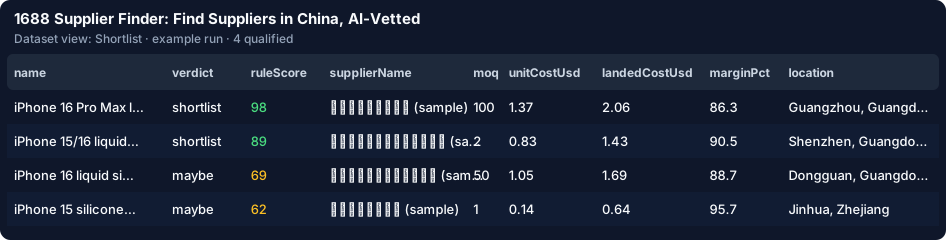
1. Open the Actor and click Try it. The form is pre-filled with a free demo: 6 sample 1688 listings for "silicone phone case". Press Start. In half a second you get 4 products: two shortlisted factories, two "maybe" rows (one without a factory inspection, one with a ¥1 placeholder price), while a trader with a 2.8 goods score and an off-topic phone stand were dropped — and nothing was charged.
2. Type your own product. In "Search 1688 for" write what you source — English works, Chinese finds more (硅胶手机壳). Describe it in "Your product brief" ("soft silicone cases for iPhone 15 / 16, Amazon, $14.99"), then set "Your order quantity" (200) and "Your sell price" (14.99). Typing the search switches the run from the demo to a live 1688 search on your own Apify account, capped by "Max source spend" ($0.50 by default).
3. Add your costs (optional). "Freight (USD per kg)" — about $6–9 for air express, $1–2 for sea — with "Unit weight" and "Import duty" turns each unit cost into a landed cost. "Minimum margin" drops anything that will not pay.
4. Leave the AI on. The AI writes the English title and attributes, checks the listing against your brief (felt sheet vs felt bag), writes a sourcing note with risk flags and drafts the supplier message in Chinese with an English copy. Every answer is checked: attributes must appear in the Chinese title, the message may quote only your quantity and target price.
5. Read the Shortlist. One row per product, best first: verdict, supplier score 0–100 with reasons ("composite score 4.6/5", "factory inspected by 1688"), MOQ, unit cost at your quantity, landed cost, margin, city in English. The "Supplier messages" view has the RFQ ready to paste into 1688 chat.

One search reads 100 listings: $0.20 on your Apify account for the scraper. At a 40 % hit rate about 40 products qualify. With AI on that is 40 × ($0.015 + ≈ $0.0011 of model tokens) — $0.84 for the run all in, ≈ $0.021 per qualified product. Rules only: $0.44. Your first 25 qualified products are free, so a first search costs the scan, 15 paid products and the tokens (≈ $0.47). Selling on Amazon.de or .co.uk? Pick EUR or GBP and add your import VAT: landed cost and margin come in your currency. Sourcing for several clients? Put them all in one run with the Agency clients list — each gets its own search, memory, digest and branded report. Listings that fail your filters, off-topic listings and duplicates are never charged by the Actor.
Save the run as a task and schedule it weekly with your e-mail in "E-mail me the new products". The cross-run memory remembers every product you were charged for, so each week brings only new suppliers — and the digest shows how the median landed cost of your search moves. From code:
from apify_client import ApifyClient

client = ApifyClient("<YOUR_API_TOKEN>")
run = client.actor("<your-apify-username>/1688-supplier-finder-ai").call(run_input={
    "queries": ["silicone phone case"],
    "goalDescription": "Soft silicone iPhone 16 cases for Amazon at $14.99, factory-direct",
    "orderQuantity": 200, "targetSellPriceUsd": 14.99,
    "maxQualified": 50, "maxDiscoveryChargeUsd": 0.5,
})
for item in client.dataset(run["defaultDatasetId"]).iterate_items():
    print(item["verdict"], item["supplierName"], item["landedCostUsd"], item["url"])
Then send your messages by hand in 1688 chat, a few a day, order samples from the two or three best, and pay through 1688's trade assurance. The Actor ranks suppliers; the sample decides.
1688 Supplier Finder: Find Suppliers in China, AI-Vetted on the Apify Store →