DGFT Notification Watch: India Export Rules, Bans, MEP on the Apify Store →
A rice exporter hears about a new export condition from a buyer's e-mail three days after DGFT published it. By then the container is already booked. This tutorial shows how to get every new DGFT, APEDA, MPEDA and FSSAI rule that touches your goods the morning after it is listed. Each one arrives filtered by HS code, typed (ban, MEP, restriction, duty, incentive, procedure) and with its PDF link. The tool is DGFT Notification Watch on the Apify Store. Disclosure: I built it.
India's export rules change through a stream of documents: DGFT notifications, public notices and trade notices, APEDA trade notices, MPEDA circulars and FSSAI orders. Each publisher has its own list page, and none of them lets you filter by HS code. The subject line often names a product ("Export of Sugar to EU under Tariff Rate Quota") rather than a code. Many of DGFT's PDFs are scans: on 2026-11-21, 10 of 17 DGFT notices had no text layer.
A documentation desk that checks these by hand opens every new PDF, searches it for its codes and writes a note for the shipping team. On our 5-sample test that took about 4 minutes a notice. The real cost is the notice on a list nobody opened that week: a new minimum export price (MEP), a quota window or a ban "with immediate effect".
1006 matches its 8-digit lines.ban, minimum_export_price, restriction, export_duty, incentive, procedure. Urgent types come first, with the effective date when the notice gives one.unconfirmed, and never charged.1006 for rice, 0904 for pepper, 1701 for sugar. You can also pick a ready watch under Start from a ready search: rice, spices, sugar, seafood, FSSAI labelling, importer restrictions, or every ban / MEP / restriction / duty on all goods.lookbackDays: 7 for a weekly check, or 30–60 the first time so you can see what you missed.
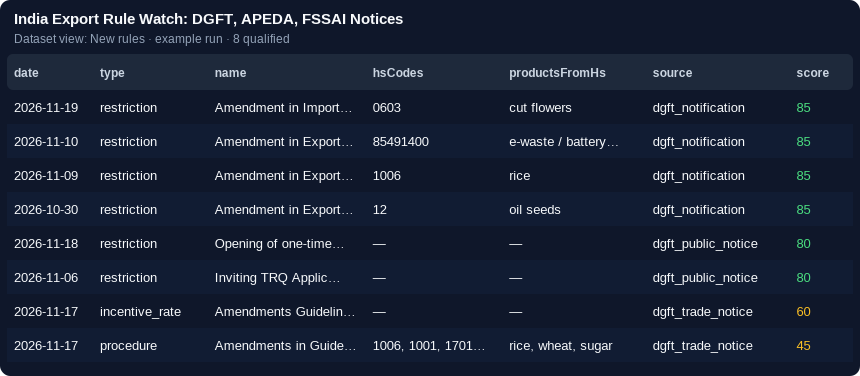
This is DGFT Notification 49/2026-27 from the free demo. The rules alone give you the type, the HS code and the goods:
{"type": "restriction", "hsCodes": ["85491400"], "productsFromHs": ["e-waste / battery scrap"], "score": 85,
 "generatedText": "Restriction notice 49/2026-27 of 2026-11-10 · HS 85491400 (e-waste / battery scrap)."}
With the AI on, the same notice also carries the note your desk would have written. This is the 2026-11-21 run on a free Gemini key:
{"fitScore": 85, "label": "hot",
 "summary": "The notice amends the export policy for waste and scrap of primary cells, batteries, and electric accumulators, specifically Lithium-Ion Battery Black Mass. It applies to exporters dealing in battery scrap under HS 85491400.",
 "recommendedNextStep": "Review licensing requirements and policy conditions for open shipments under HS 85491400."}
The rice notice in the same sample, "Amendment in Export Policy Condition under HSN 1006 of Schedule-II", comes with the next step "Review the revised export policy conditions for shipments under HSN 1006 to ensure compliance before dispatch."
The first 10 notices are free. After that you pay $0.0125 per qualified notice, or $0.03 + ≈ $0.0021 of measured AI tokens with the AI reading, plus $0.10 per digest that delivered a billed notice. Notices outside your codes, repeats, scanned bans kept for you and the demo cost nothing.
Measured on 2026-11-21:
Save the input as a task, click Schedule → daily and put your address into E-mail me. On every morning with new rules the digest is waiting. Quiet days send nothing and cost nothing, because dedupeAcrossRuns keeps the watch's memory between runs.
From Python:
from apify_client import ApifyClient

client = ApifyClient("<YOUR_API_TOKEN>")
run = client.actor("rich_minds/trade-regulation-watch-ai").call(
    run_input={"sourceMode": "live", "hsCodes": ["1006"], "lookbackDays": 7, "enableAi": True,
               "maxQualified": 50, "maxDiscoveryChargeUsd": 0.5, "failOnSourceError": True},
    timeout_secs=900)
out = client.key_value_store(run["defaultKeyValueStoreId"]).get_record("OUTPUT")["value"]
if not out.get("ok", True):
    raise RuntimeError(out.get("outcome"))
for row in client.dataset(run["defaultDatasetId"]).iterate_items():
    print(row["date"], row["type"], row["hsCodes"], row["url"])
If your pipeline must know when a publisher did not answer, alert on OUTPUT.refused[].reason == "failed". Without code, the importable n8n workflow, the Google Sheets tracker and the Slack / Telegram alerts are in the README's Integrations section. An AI agent can call it through Apify's MCP server: https://mcp.apify.com/?actors=rich_minds/trade-regulation-watch-ai.
The demo is free and the first 10 real notices are free: DGFT Notification Watch on Apify. Type your HS codes, press Start, and schedule it once the rows look right.
DGFT Notification Watch: India Export Rules, Bans, MEP on the Apify Store →