Facebook Page Post Tracker: AI Winning Posts & Offers on the Apify Store →
Tutorial article (800–1500 words) for the Apify blog guest program, dev.to, Medium, Hashnode. The owner publishes it and records the URL in brief.json → marketing.links.
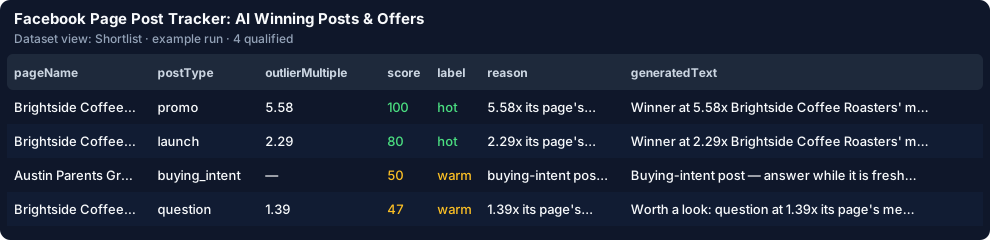
You follow five rival Facebook pages. Every Monday you open each one, scroll the week, and try to remember which post took off, which one announced a discount and what the code was. Reactions, comments and shares are on the page, but a page with 10,000 followers and a page with 800 are not comparable, so "1,200 reactions" tells you nothing until you know that page's usual. It takes about 6 minutes a post to read it, check its numbers against the page and note the offer — 10 hours for 100 posts — and the posts where someone asks "where can I buy this?" are buried in the scroll.
Four pages × 20 posts = 80 posts scanned; about 28 qualify (an estimate until a live run is measured). The scan costs $0.48 on your account. Here you pay $0.0043 per qualified post — $0.01 with AI plus about $0.003 of tokens. Your first 25 posts are free, so the first run costs the scan plus three posts. A rules-only run is about $0.60, a run with AI about $0.84. Posts that fail your filters, empty posts and posts you already received are never charged here.
Click Schedule on the saved task, put your address in "E-mail me the new posts" and every run with new posts sends a digest with the trend since the last run. Each post is remembered by its Facebook post id, so next week you pay only for new ones. From code:
from apify_client import ApifyClient

client = ApifyClient("<YOUR_API_TOKEN>")
run = client.actor("<your-apify-username>/fb-page-post-tracker").call(run_input={
    "sourceMode": "actor",
    "pageUrls": ["https://www.facebook.com/starbucks", "https://www.facebook.com/dunkin"],
    "goalDescription": "Competitor posts that announce an offer or a launch",
    "maxQualified": 50,
    "maxDiscoveryChargeUsd": 0.5,
})
for item in client.dataset(run["defaultDatasetId"]).iterate_items():
    print(item["url"], item["score"], item["postType"])
Facebook Page Post Tracker: AI Winning Posts & Offers on the Apify Store →