Trending Keywords for Your Niche: AI Google Trends Alerts on the Apify Store →
How to find trending keywords for your niche with Trending Keywords for Your Niche: AI Google Trends Alerts
Tutorial article (≈ 900 words) for the Apify blog guest program, dev.to, Medium and Hashnode. Refreshed with the first real run by /actor-marketing; the owner publishes it and records the URL in brief.json → marketing.links.
The problem
Every morning Google Trends lists 50 to 1,000 trending searches per country. For a fitness store, a SaaS blog or a newsletter, almost all of them are sport scores, celebrity news and weather — the three searches that concern your niche are somewhere in the list. Content marketers open the Trending now page for each country, scroll, copy the promising terms into a sheet, then open Explore for their own product keywords to eyeball whether the curve is rising. That is 20–30 minutes a day, and the same trends come back tomorrow.
The raw Google Trends scrapers on Apify do not change that: they return every row and bill every row. You still read them all, and a scheduled morning and evening run give you the same trends twice.
Step by step
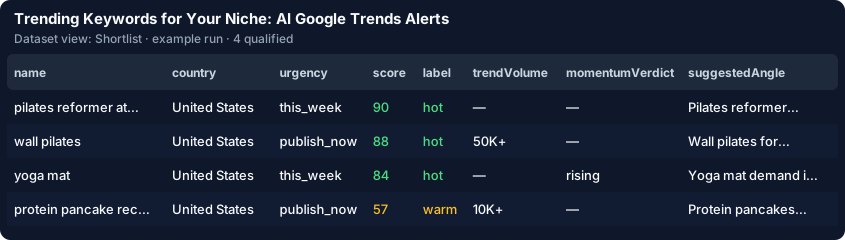
- Open the Actor and click Try it. The form is pre-filled with 7 sample Google Trends rows (the free demo). Press Start: 4 qualify — "wall pilates", "protein pancakes", the rising seed "yoga mat" (+22.8 % over 4 weeks) and the rising query "pilates reformer at home" (+4,250 %). The NFL game, the hurricane warning and a dumbbell recall are dropped for free.
- Type your niche keywords — for example
pilates, yoga, protein, home workout — and pick your countries (US, GB, CA). Add a one-line description of your niche ("Home fitness equipment store for women 30–50"): the AI judges relevance against it and writes the angle in your voice. Typing your keywords switches the form from the sample to the live read of Google Trends, capped by "Max source spend" ($0.50).
- Add seed keywords you care about (
yoga mat, creatine): each gets a momentum verdict — breakout, rising, seasonal peak soon, stable or declining — with the % change, the peak and the next seasonal peak.
- Keep "AI verdict and content angle" on and press Start. Open the Content plan view: urgency, the headline, the format, the target keywords and why it matters.
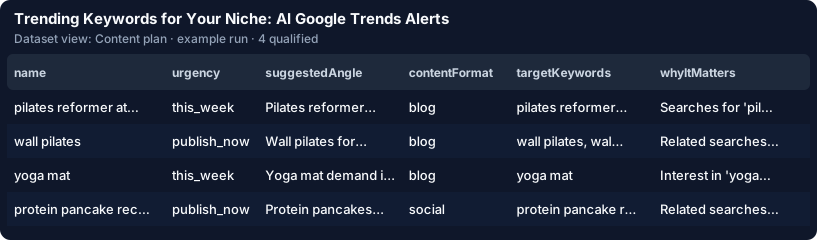
- Export the view to CSV / Excel, or connect Google Sheets from the Integrations tab.
What a run costs
Measured on 2026-09-29 with the food preset: the first run read the last 7 days of 4 countries (2,620 trending searches, free) and 5 seed keywords ($0.01 each) → 28 qualified trends in 10 seconds. Rules only: 28 × $0.003 + $0.05 = $0.13 in total. With the AI: 28 × ($0.009 + ≈ $0.0062 tokens) + $0.05 → $0.48, about $0.017 per trend all in. Your first 25 qualified trends are free, and off-niche trends are never charged by the Actor.
Automate it
Your first real run saves the search as a task — open it and click Schedule (daily for trending searches). Put your e-mail into "E-mail me the new trends": every run with new trends sends the digest, what to act on first per country. The cross-run memory skips every trend you already received. Or call it from code:
from apify_client import ApifyClient

client = ApifyClient("<YOUR_API_TOKEN>")
run = client.actor("<your-apify-username>/trending-keywords-ai").call(run_input={
    "nicheKeywords": ["pilates", "yoga", "protein"], "countries": ["US", "GB"],
    "goalDescription": "Home fitness equipment store for women 30–50",
    "maxQualified": 50, "maxDiscoveryChargeUsd": 0.5,
}, timeout_secs=3600)
for item in client.dataset(run["defaultDatasetId"]).iterate_items():
    print(item["urgency"], item["score"], item["name"], item["suggestedAngle"])
Trending Keywords for Your Niche: AI Google Trends Alerts on the Apify Store →