eBay Sold Listings Comps AI: Price Checker & Max Buy Price on the Apify Store →
A tutorial for resellers, flippers and anyone who prices items from eBay's sold listings. Try it free on the Apify Store: https://apify.com/rich_minds/ebay-sold-comps-ai
You found a Nintendo Switch OLED at a garage sale for $150. Is it a deal? The honest answer is in eBay's sold listings, but the raw list misleads you. Search "nintendo switch oled", tick Sold items, and the results mix in a unit sold "for parts, no power", an empty box, a carrying case, a Switch Lite, a "lot of 2" and a "Best Offer accepted" sale whose shown price is only what the seller asked, not what the buyer paid. Average all of that and the number you bid on is off in whichever direction the junk leans.
Resellers fix it by hand. Copy 100 sold rows into a sheet, delete the junk line by line, divide the lots, drop the Best-Offer rows, compute a median per condition, subtract eBay's fee, shipping and the profit you want. That is the same twenty minutes for every item, again every time the market moves.
The tools you already have each cover part of the job:
caffein.dev/ebay-sold-listings, 729 users a month) give you every sold row at $0.004 each, junk included, and leave the spreadsheet work to you.eBay Sold Listings Comps AI sits on top of that scraper and does the spreadsheet work: it removes the junk for free, keeps only sales of your exact item, and returns a price report with a median, a band, a suggested list price and a max buy price after your fees.
Open https://apify.com/rich_minds/ebay-sold-comps-ai and click Try it. The form is pre-filled with 16 sample sold listings of a Nintendo Switch OLED, fictional rows built to contain every kind of junk a real search returns. Press Start.
The run ends in a fraction of a second (0.2 s in our local run) with this status:
Done: 9 qualified comps from 16 loaded, 7 junk / outliers rejected free · median 232.00 USD (8 comps)
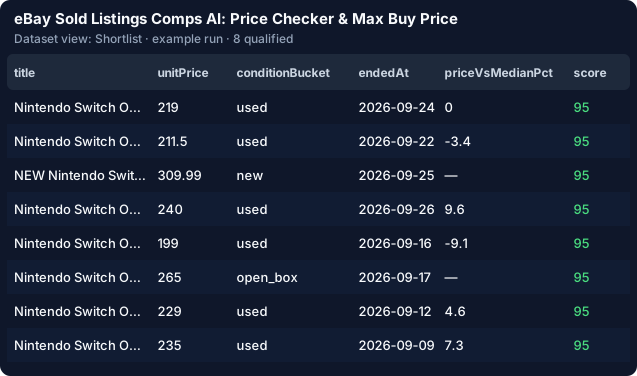
Seven rows were rejected, each for its own reason and each for free: the for-parts unit, the empty box, the case (an accessory), the Switch Lite (a variant of another model), the lot of 2, a sale in pounds inside a dollar report, and a price outlier. The Shortlist view shows the nine clean comps, best match first:
Open the key-value store and the PRICE_REPORT record. For the sample it says:
| Figure | Value |
|---|---|
| Median of 8 clean sales (30 days) | $232.00 |
| Band p25–p75 | $217.12 – $273.50 |
| Median per condition | used $219.00 · open box $265.00 · new $304.50 |
| Auction vs Buy It Now median | $211.50 vs $235.00 |
| Sales per day · trend | 0.3 · +4.3 % |
| Suggested list price (used) | $224.00 |
| Max buy price at a 13.25 % fee | $194.32 |
The max buy price is the list price × (1 − fee) − shipping − target profit. Set shippingCost and targetProfit in the form and it becomes your bid limit. Our garage-sale Switch at $150 is under it with room to spare.
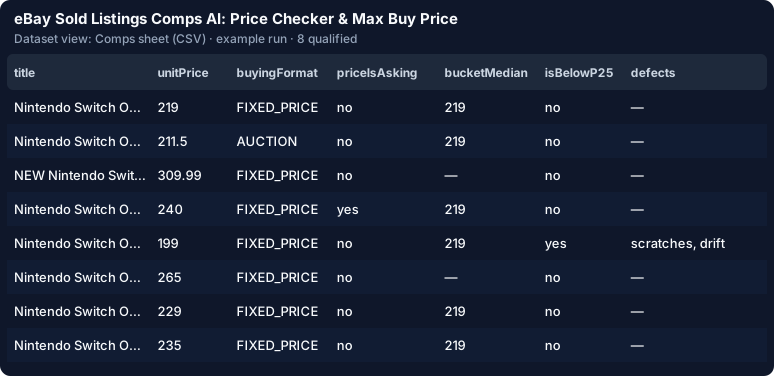
The Best-Offer row is still delivered, marked priceIsAsking: true, but it never enters the median. Graded trading cards get a byGrade breakdown, so a PSA 10 and a raw card never share one number.
Type your item into keywords, e.g. iphone 13 pro 128gb. That switches the source to the live eBay search, which runs eBay Sold Listings Search on your own Apify account, capped by maxDiscoveryChargeUsd ($0.50 by default). Then:
itemDescription ("iPhone 13 Pro 128GB unlocked, working") for the AI check;mustExclude terms for the neighbours you never want (max, mini); matching is number-aware, so 128gb also matches "128 GB";enableAi on: your first 25 comps are free, AI-checked ones included.The Comps sheet (CSV) view has every price column: sold, shipping, total, lot size, unit price, condition median, % vs median, cheap-sale flag and defects, ready to paste into your sheet.
Rules catch the obvious junk. The AI reads the borderline and used sales against your words. Here is the same sample comp from our AI example run (own Groq key, openai/gpt-oss-120b), checked against "Nintendo Switch OLED console with dock and Joy-Cons, working, any colour":
{"title": "Nintendo Switch OLED 64GB Neon Red/Blue - Tested, Works Great", "unitPrice": 211.5, "score": 85,
 "attributes": {"brand": "Nintendo", "model": "Switch OLED", "storage": "64GB", "color": "Neon Red/Blue"},
 "aiAssessment": {"verdict": "exact", "confidence": 0.85, "severity": "none",
                  "reason": "Title matches Nintendo Switch OLED 64GB Neon Red/Blue, the same console model and storage."}}
Every attribute and defect must be a substring of the listing, or it is dropped, and the model never writes a price. On Apify's model access the check runs on anthropic/claude-haiku-4.5. Without it you can bring your own Gemini or Groq key (llmProvider: byok), and the free demo shows labelled sample verdicts.
You pay per clean comp, never per raw row. Rejected rows, sales you already received and the demo cost nothing.
A worked example (estimate, from the demo's rate of 9 clean comps in 16 rows): 1 keyword × 100 sold rows = $0.40 source → ≈ 56 clean comps. AI off: ≈ $0.68 all in. AI on for the ≈ 42 used / borderline comps: ≈ $0.95 all in, tokens included. For comparison, the comps Actors that compute a price band on the Store charge $0.02–0.03 per comp.
Click Actions → Save as a new task → Schedule, put your address in notifyEmail, and keep dedupeAcrossRuns on. Each run then charges only new sales, while the report still uses every clean sale in the window. The e-mail digest gives the median per keyword and its change since the last run. slackWebhookUrl / discordWebhookUrl post the same digest, and alertOnly: true stays quiet until a sale lands under your max buy price or a median moves 10 %.
A 5-item watchlist (daysToScrape: 7, maxSoldPerKeyword: 50) is estimated at ≈ $1.68 a week rules only.
from apify_client import ApifyClient

client = ApifyClient("<YOUR_API_TOKEN>")
run = client.actor("rich_minds/ebay-sold-comps-ai").call(
    run_input={"keywords": ["iphone 13 pro 128gb"], "itemDescription": "iPhone 13 Pro 128GB unlocked",
               "targetProfit": 60, "maxDiscoveryChargeUsd": 0.5},
    timeout_secs=3600)
report = client.key_value_store(run["defaultKeyValueStoreId"]).get_record("PRICE_REPORT")["value"]
for r in report["reports"]:
    print(r["keyword"], r["stats"]["median"], r["maxBuyPrice"])
For Claude, ChatGPT or any MCP client, add {"mcpServers": {"apify": {"url": "https://mcp.apify.com/?actors=rich_minds/ebay-sold-comps-ai"}}} and ask "Price a Steam Deck OLED 512GB on eBay US: median and max buy price with a $50 profit." An importable n8n workflow (Monday → run → Google Sheet upsert on dedupeKey → Slack) and a Sheets template are linked from the Actor's README.
Public sold listings only, fetched on your account, no login. 8 eBay sites, 1–6 keywords per run, up to 90 days back, one currency per report. eBay shows the asking price on Best-Offer sales; if you need the accepted price, 130point is the better tool for that one lookup.
Try it: https://apify.com/rich_minds/ebay-sold-comps-ai. The first 25 clean comps are on us. If it saves you the spreadsheet hour, a review on the Store helps other resellers find it.
eBay Sold Listings Comps AI: Price Checker & Max Buy Price on the Apify Store →