Twitter Lead Generation: AI Buying-Intent X Leads, 25 Free on the Apify Store →
Tutorial for the Apify blog guest program, dev.to, Medium and Hashnode. When cross-posting, set the canonical URL to the Store page — https://apify.com/rich_minds/twitter-lead-generation-ai — and record the published URL in brief.json → marketing.links. Disclosure line for every copy: "I built this Actor."
Every day, people on X write things like:
Each of those tweets is a buyer telling the world what they need, often with a deadline and the tool they are leaving. The first helpful reply usually wins the conversation. That is Twitter lead generation in its simplest form: find the person who is already asking, and answer well.
Doing it by hand means an X Advanced Search per phrase ("looking for", "any recommendations", "alternative to", "switching from") per product term, every day. Most of what comes back is noise: vendor launches, giveaways, hiring posts, bots and people saying they are not looking for recommendations. A tweet scraper makes collecting faster, but it bills every row — the junk included — and still leaves the reading to you.
Twitter Lead Generation: AI Buying-Intent X Leads is an Apify Actor that does the search and the reading: it builds the intent queries, runs X Tweet Scraper on your Apify account, throws the junk away for free, and hands you a ranked list of people — the need quoted from their tweet, their role and company from the bio, a lead score and a reply draft. You pay per qualified lead, not per tweet.
Open the Store page and click Try it. The form is pre-filled with a demo: 9 sample tweets about email marketing for Shopify stores, the offer "Email marketing tool for Shopify stores" and two competitors, Mailchimp and Klaviyo. Press Start.
What the demo run returns (measured locally: 2.0 s end to end, nothing charged):
| Tweets in | Leads out | Hot / warm | Rejected for free |
|---|---|---|---|
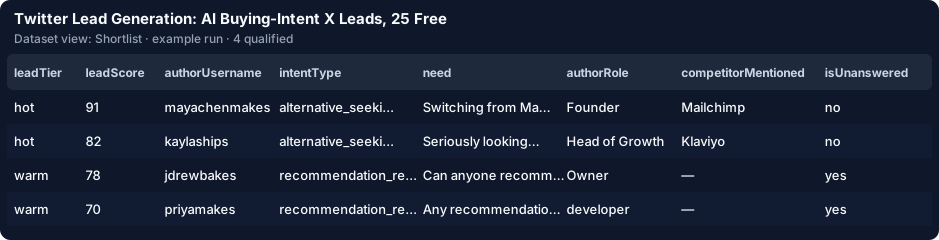
| 9 sample tweets | 4 | 3 / 1 | 5 — a vendor promo, a hiring post, a giveaway, an automated account and a "not looking for recommendations" tweet |
The four leads, best first, as the run's digest lists them:
The demo tweets are fictional samples, so you can see the shape of the output before you spend anything.
Replace the demo fields with yours. Three fields are enough:
productKeywords — 1–10 words your buyers use for what you sell: invoicing app, invoice software. Leave it empty and the Actor reads the terms from your offer (it lists them in the status).offer — one sentence about your product: "Invoicing app for freelance designers — one-click invoices and automatic payment reminders." The AI and the reply drafts use it.competitorNames — the tools your buyers leave: FreshBooks, @HoneyBook. This adds "alternative to / switching from / cancel" searches and excludes the competitors' own accounts.Typing your own terms switches the run from the demo to the live X search on your account. Leave enableAi on — it is the part that tells a real shopper from a vendor or a joke.
Optional, and all free (applied before anything is charged): icpBioKeywords (freelance, designer, founder) so the author's bio decides the fit, minScore (60 by default; raise it to 70 for fewer, stronger leads), follower bands, withinDays (7 by default), excludeTweetsWithLinks and ownHandles so your own team never shows up.
The Actor turns your terms into X advanced-search queries (intent phrase × product term, no retweets, under X's 512-character limit), runs X Tweet Scraper on your Apify account — 500 tweets by default, stopped at maxDiscoveryChargeUsd ($0.50) — and filters the results:
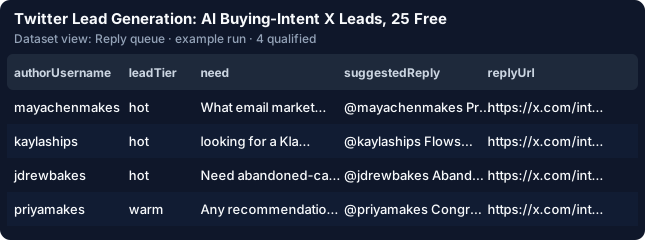
OUTPUT.rejectedByReason.Open the Reply queue view. Every row has the reply draft and a one-click replyUrl that opens X's reply box. The demo's labelled sample AI draft for the Klaviyo tweet (aiModel: "sample" — your own search gets a live verdict) reads:
@kaylaships Flows breaking right before a renewal is the worst timing. We built an email marketing tool for Shopify
stores with simpler flows — happy to show how a Klaviyo switch works before October.
Drafts name your product only where the person asked for a recommendation or an alternative, and carry no link unless you set offerUrl. The Actor never posts — you edit and send.
Pricing is pay per event, one event per qualified lead:
| Event | Price |
|---|---|
| Your first 25 qualified leads | $0.00 |
| Qualified lead, rules only | $0.0025 |
| Qualified lead with the AI verdict and tailored reply | $0.009 |
Never charged: the search itself, the rejected tweets, leads below minScore, tweets the AI calls "not a genuine buyer", and leads a previous run already delivered.
A worked example (an estimate until your own run reports it in OUTPUT): 500 tweets scanned → about 20 qualified leads. X Tweet Scraper costs $0.075 on your account (500 × $0.00015), 20 × $0.009 = $0.18 here, plus about $0.10 of AI tokens: $0.36 in total, about $0.018 per lead. Rules only: $0.075 + 20 × $0.0025 = $0.13. Your first 25 leads cost nothing here.
That is more per unit than a raw tweet scraper — about 1.4× the $0.0017 median of the X Actors the Store shows for "twitter lead generation". The difference is what you pay for: one qualified lead stands in for roughly 25 raw tweets you would otherwise read and judge yourself.
A live run saves its search as a task and links it in the status message. Open it, click Schedule (daily or weekly), and put your address in notifyEmail. Every run with new leads e-mails a digest like the one above: the count per intent type, the trend versus the last run ("qualified 41 → 55, hot 5 → 9"), and the top leads with links.
The cross-run memory (dedupeAcrossRuns, on by default) remembers every tweet and author you were charged for, so a scheduled run delivers — and bills — only new people. Running for several clients? Give each saved task its own dedupeStoreName.
slackWebhookUrl / discordWebhookUrl for the digest.webhookUrl into a Make or Zapier scenario that creates or updates a HubSpot contact or a Pipedrive person, upserted on dedupeKey (tweet:<id>), so a lead found twice never becomes a duplicate.sourceMode: "list" first — it scores tweets you send and never starts a search.from apify_client import ApifyClient
client = ApifyClient("<YOUR_API_TOKEN>")
run = client.actor("rich_minds/twitter-lead-generation-ai").call(run_input={
"productKeywords": ["invoicing app"],
"offer": "Invoicing app for freelance designers",
"competitorNames": ["FreshBooks"],
"maxQualified": 25,
"maxDiscoveryChargeUsd": 0.5, # spend cap for the X search on your account
}, timeout_secs=3600)
for lead in client.dataset(run["defaultDatasetId"]).iterate_items():
print(lead["url"], lead["score"], lead["label"], lead["need"], lead["replyUrl"])https://mcp.apify.com/?actors=rich_minds/twitter-lead-generation-ai to Claude, Cursor or any MCP client and ask it to "find people on X asking for an invoicing app this week and list the hot ones".For a one-off look at a single live thread, X Advanced Search is free and instant. If you need Reddit, LinkedIn and Hacker News in one seat-based dashboard, a social-listening suite does more. This Actor is for the daily habit on X: the queries built for you, the junk dropped for free, and a short list of people worth answering.
Try it: Twitter Lead Generation on the Apify Store — the form is pre-filled with the free demo, and your first 25 leads are free.
Twitter Lead Generation: AI Buying-Intent X Leads, 25 Free on the Apify Store →